
Perfmatters WordPress Performance Plugin
Original License Activation | Official 1 Year license
Speed up Perfmatters WordPress Performance Plugin
Speed up Your Website with Perfmatters WordPress Performance Plugin – Original License, One-Year Activation at Best Prices! Perfmatters is a powerful tool to make your WordPress site faster and better. In the digital world, where speed and making visitors happy are really important, Perfmatters helps you improve your website’s performance and efficiency.
It helps you manage scripts, clean up your database, and optimize web fonts. If you want your website to be faster and work better, Perfmatters is a great choice.
What Makes Perfmatters The Best Performance Plugin In WordPress?
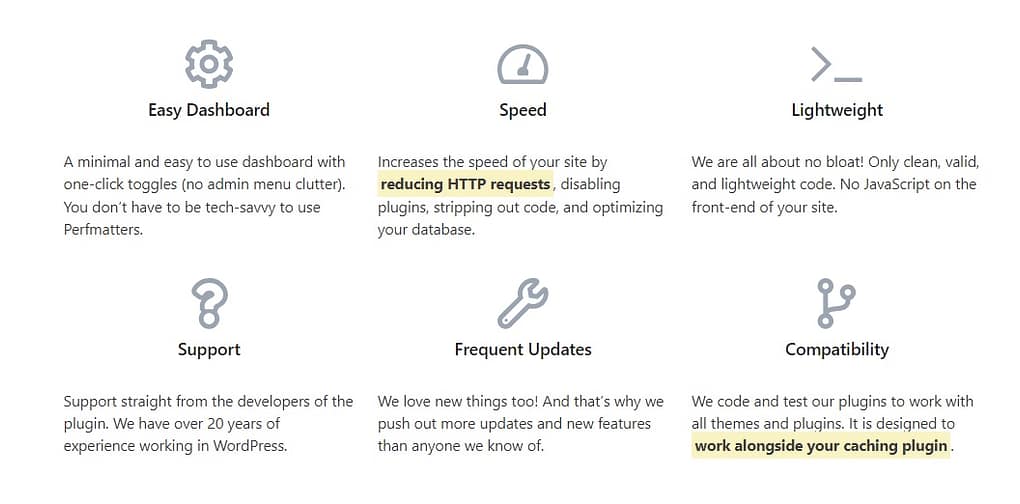
The primary way this plugin accelerates your site is by deactivating unnecessary scripts that may not be used on your website.
For instance, emojis typically load on every page by default. If you don’t use them, this just adds unnecessary weight. Disabling them prevents the script from loading, reducing the number of HTTP requests and your page size.
Another valuable feature is database optimization. Over time, elements like revisions, auto-drafts, spam comments, and transients accumulate in your database, gradually affecting your site’s performance.
With Perfmatters, you can easily clean up these elements and even set limits to prevent them from accumulating again. This ensures a responsive and efficient database for your site.
Here’s a list of all the features you need to know about Perfmatters:
- Script Manager: Easily disable scripts on a per-post/page basis or across your entire site with one click. Grouped by plugin and theme.
- Database Optimization: Clean up your database by removing revisions, auto-drafts, spam comments, and transients, and set limits to prevent future bloat.
- Quick-Toggle Options: Disable unnecessary scripts like emojis, embeds, and dash icons, and limit post revisions to improve site performance.
- Lazy Loading: Delays the loading of images, videos, and iframes until users scroll down the page, reducing initial page load times.
- Change Login URL: Increase security and performance by changing your WordPress login URL to prevent brute-force attacks.
- CDN Rewrite: Easily connect your WordPress site to a Content Delivery Network (CDN) and rewrite asset URLs for faster content delivery.
- Host Google Fonts Locally: Host Google Fonts on your server or CDN to reduce DNS lookups and improve site speed.
- Preloading Resources: Automatically prefetch URLs to speed up page loading and reduce rendering delays.
- Defer and Delay JavaScript: Improve site performance by deferring JavaScript loading and delaying it until user interaction occurs.
- Remove Unused CSS: Automatically remove unused CSS code to improve site speed and reduce render-blocking resources.
- Performance Checklist: Access a performance checklist to ensure your site adheres to Core Web Vitals and loads quickly on mobile devices.
- Multisite Support: Use the unlimited license for WordPress multisite setups, pushing settings from the network default site to subsites.
- Expert Support: Get direct support from developers, who have over 19 years of experience working with WordPress.
- Scheduled Optimization: Schedule automatic database optimization on a daily, weekly, or monthly basis for hassle-free maintenance.
- WebP and AVIF Support: Optimize image loading with support for WebP and AVIF image formats.
- Privacy Features: Anonymize your IP for data privacy and GDPR compliance when using Google Analytics.
- Instant Page: Automatically prefetch URLs in the background to achieve near-instant load times.
- Per Page/Post Configuration: Customize settings for individual pages and posts, tailoring your site’s performance.
- Full Control: Fine-tune every aspect of your website’s performance, from scripts to database maintenance, all in one plugin.
- Feature Requests: Contribute your ideas for improvements and features, making Perfmatters even more powerful.
These features empower website owners to optimize their site’s performance and improve user experience with ease.
Now Let’s go a little deeper,
Quick-toggle options
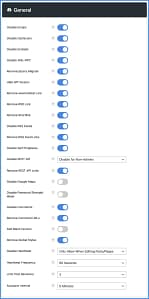
- No More Emojis, Embeds, or Dashicons: Switch off things like emojis, embeds, and dash icons if you don’t need them on your site. These are fun stickers, videos, and small pictures that you might not always use.
- Keep Your Revisions in Check: Sometimes, your website saves too many copies of your work, which can make it slow. You can tell your website to save fewer copies, just like when you clean up your toys to keep your room tidy.
- Save Your Work Less Often: Your website might save your work too many times, which can be annoying. You can tell it to save less often, and that way, you won’t get those “there is a more recent version” messages.
- Stop the Heartbeat: The Heartbeat can be like a machine that works too hard and makes your website slow. You can make it rest or slow down a bit so it doesn’t use too much power.
- No Comments or Web Links: If you don’t have a blog or you don’t want people to leave comments, you can turn them off. This can help keep your site safe and clean.
- Google Maps When Needed: Google Maps can be heavy for your site. You can use them only when you need them, like finding your way to a new place.
- Say Bye to Cart Delays: Sometimes, when you’re shopping online, the cart takes too long to load. You can make it faster by turning off some fancy things.
By making these changes, your website will work faster and be more fun for everyone who visits. Just remember to ask a grown-up for help if you’re not sure how to do it!
Script Manager
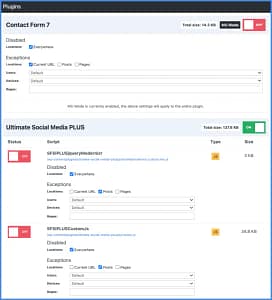
The Perfmatters plugin comes with a powerful Script Manager feature. With just a simple click, you can deactivate scripts on individual pages or for your whole website. These scripts are neatly organized by their source, showing which plugins and themes use them, and making them easy to understand.
You can also turn off scripts based on the device (like desktop or mobile) and whether users are logged in or out. This is super helpful and can make your WordPress site much faster, especially your homepage.
Here are a few examples of how you can use it:
- The Contact Form 7 plugin can load on every page, but you can quickly turn it off everywhere except your contact page.
- Social media sharing plugins are best for your posts. You can disable them everywhere else and have them load only on post types, or even custom post types.
Perfmatters designed the Script Manager to be easy to use, but there are also advanced features. For instance, you can deactivate specific combinations of scripts using something called Regex.
We use the Script Manager on all our sites to make sure they load super fast.
Database optimization
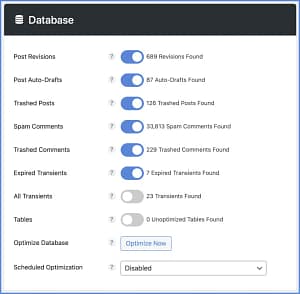
Keeping your WordPress site in good shape and speedy is just as important as taking care of your car. Like oiling and maintaining your car, your website’s database needs regular maintenance to perform at its best. The Perfmatters plugin makes it easy to clean up and remove old, unnecessary data in several ways:
- Get rid of the extra post, page, and custom post-type revisions.
- Delete those auto-drafts that pile up when you’re working on content.
- Say goodbye to all those spam comments in one shot.
- Clear out the trash from both comments and posts.
- Remove outdated transients and keep your wp_options table neat.
- Optimize your database tables to free up space that’s not being used.
Lazy loading
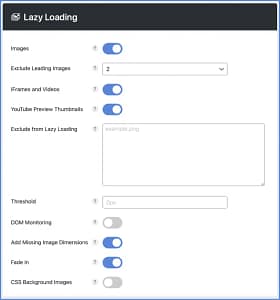
Lazy loading is like making your website smarter by delaying the loading of images, videos, or iframes until a user scrolls down the page and can see them. This is super important, especially for pages with lots of images or videos, because it reduces the number of things the website has to load all at once. In our tests, using lazy loading has made websites load about 33% faster, which is quicker than the regular way WordPress loads things.
In the Perfmatters plugin, you get some great lazy load features:
- Lazy load for images, iframes, and videos (like YouTube, Vimeo, Google Maps, and more).
- Lazy load for CSS background images.
- For videos, we replace iframes with a small picture and a play button. When you click it, the video loads super fast. This
- is the quickest way to show YouTube videos.
- We support modern image formats like WebP and AVIF.
- You can change how quickly or slowly things load when you scroll.
- You can choose not to lazy load certain images based on special parts of their code or where they are on the page.
- Leading images can be excluded from lazy loading to help the Largest Contentful Paint (LCP) be better.
- We keep an eye on how the page changes, so even on dynamic websites, it works great with infinite scrolling.
- We add the right size for images, so the page layout doesn’t jump around when things load.
- Images can also fade in nicely when they load.
Lazy loading is an awesome way to speed up your website and make it more user-friendly, and Perfmatters makes it easy to do.
Change your WordPress login URL
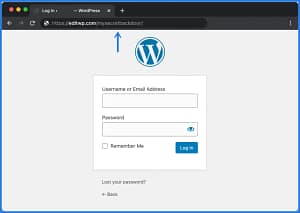
Sometimes, even the tiniest changes can have a massive impact. By default, WordPress uses the URL https://yourdomain.com/wp-admin/ for your login page.
However, the issue with this is that malicious bots and hackers often search for these standard login URLs to find weaknesses and ways to enter your site. We’ve seen many websites bombarded with over 10,000 failed login attempts every day by those trying to break in.
But here’s the good news: you can tackle this issue by simply changing your WordPress login URL to something more secretive and unique.
This change not only enhances security but also boosts performance by reducing the workload on your site caused by bots scanning common areas. With the Perfmatters plugin, you can easily switch your login URL in just a few seconds.
CDN Rewrite
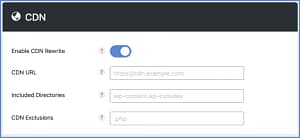
A Content Delivery Network (CDN) speeds up your WordPress site by storing your files on servers (known as POPs) located across the world, delivering these files from a cache that’s closer to your site visitors. The Perfmatters plugin is designed to easily connect your WordPress site with a CDN.
Perfmatters’ CDN rewrite offers the following features:
- You can input your CDN URL, and all your assets, including images, will be adjusted to link to your CDN, making your site faster.
- You have the choice to specify which directories in WordPress should be included in this process.
- You can also exclude specific file types and assets with particular text strings from being altered to work with the CDN.
Host Google Analytics locally
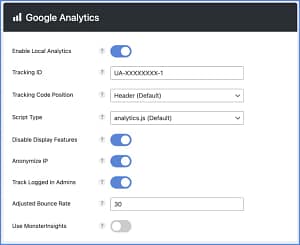
Hosting Google Analytics on your server can speed up your website by reducing unnecessary DNS lookups and resolving the “leverage browser caching” issue caused by Google’s script. Google’s script generates a warning about caching because its HTTP caching header expiration is set very short. When you host Google Analytics yourself, your own Content Delivery Network (CDN) or server’s HTTP caching headers automatically apply. In other words, you have full control over how the script is cached.
Perfmatters offers several Google Analytics features:
- Choose from six script types: analytics.js (17 KB), gtag.js, gtag.js v4, minimal (only 1.5 KB), minimal inline, and minimal v4.
- Decide whether you want the tracking code in the header or footer of your site.
- Anonymize IP addresses to protect data privacy and comply with GDPR.
- Choose whether or not to track logged-in administrators.
- Benefit from dual tracking options to transition to Google Analytics 4.
- Disable display features, reducing the number of HTTP requests.
- Adjust your site’s bounce rate to better assess your traffic quality.
- Integrate with MonsterInsights for additional analytics features while still hosting Google Analytics locally.
Add Code to Header, Body, Footer
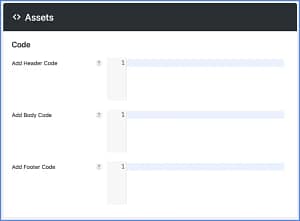
There are situations where you might want to insert custom code into specific sections of your WordPress site, such as the header, body, or footer. The Perfmatters plugin makes it simple to include custom code exactly where you need it.
The header, body, footer code feature offers the following:
- You can display code directly on the front end of your site. This might include inline CSS within